How the Site Works
The SketchingNow website has two sections – a public section and the private classroom for the Foundations Course. The menu bar along the top takes you to the public pages on the site. The sidebar is for all the private pages in the classroom (if you can’t see the sidebar menu you are not in the classroom).
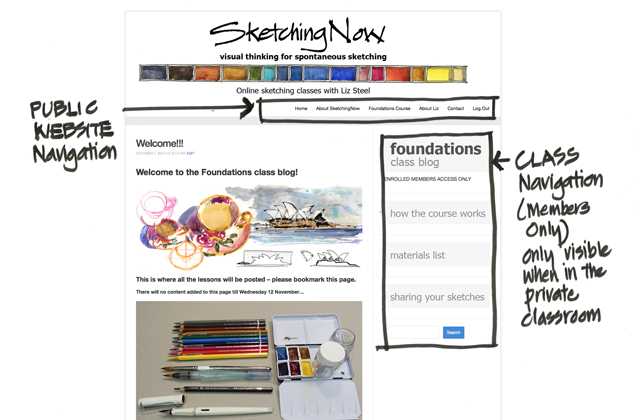
The URL for the classroom is
https://sketchingnow.com/sknf_class/
If you lose this link the easiest way to enter the classroom is to use the link at the bottom of the homepage. Go to sketchingnow.com click on the image and follow the prompts. 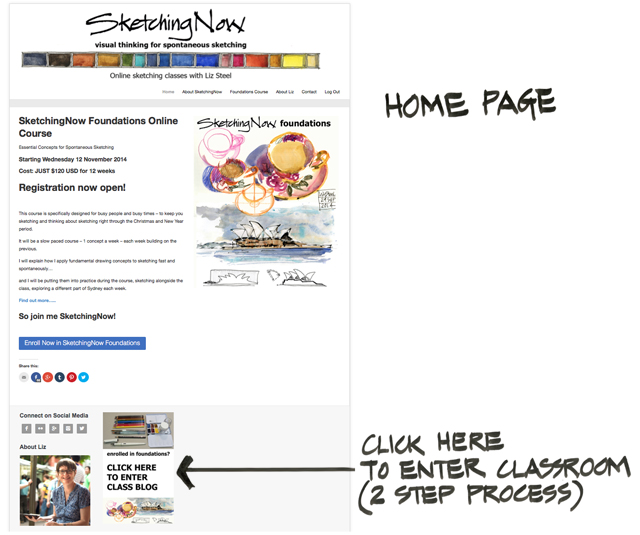


How do you add an avatar to your name? I went into profile , but I did not see how to add.
Looking forward to this class!! Love what I have seen so far!
Julie
So excited to see the Lesson 1! What a wonderful beginning
Hi Liz,
And hi everyone in the virtual class. I’m so eager to start this course, tho’ I too have little time after work for. This is going to be so much fun!
Thank you, Liz
I’m all signed up. Very excited to be doing this after attending the workshop in Sydney a month ago. Merci Liz!